
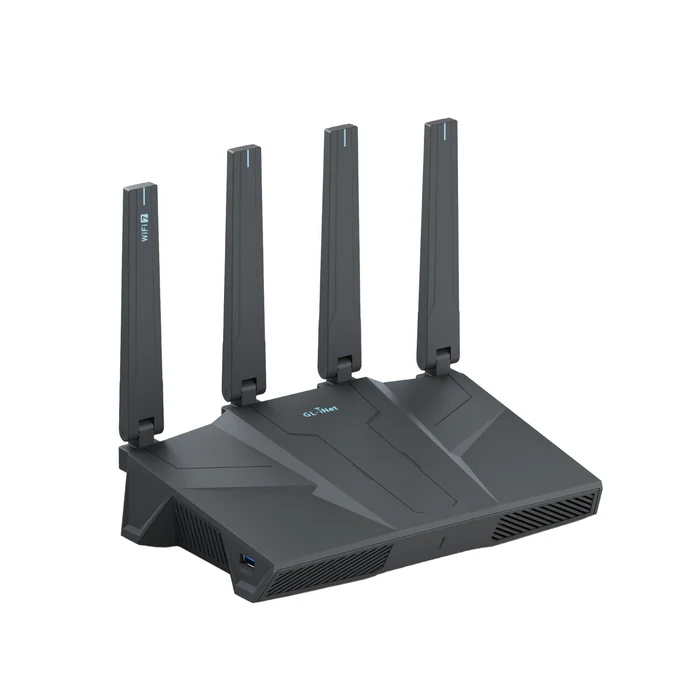
Flint 3e (GL-BE6500) Dual-band Wi-Fi 7 Home Router
by AFI WIRELESS US
$179.99
In stock
Added to cart.
- Enjoy FREE SHIPPING for all products, with an estimated delivery time of 5-8 working days.
- Products with the "Ship from China" tag are shipped from outside the US and are subject to TAX & VAT & longer delivery time.
- If you are a customer located outside of the US, please visit the Global Store for international shipping options.
Flint 3e (GL-BE6500)
BE6500 dual-band Wi-Fi 7 home router
- Wi-Fi: max. 688 Mbps (2.4 GHz) + 5,764 Mbps (5 GHz)
- Wired: five 2.5GbE ports for multi-gig LAN and flexible WAN
- VPN (AFI WIRELESS figures): up to ~680 Mbps WireGuard® and OpenVPN-DCO over Ethernet
- Software: AdGuard Home, parental controls (incl. Bark integration), AstroWarp, GoodCloud-ready workflows
- Expansion: USB 3.0 for storage or tethering
Amazon Climate Pledge Friendly Certification
The smart choice for the Wi-Fi 7 generation
Flint 3e (GL-BE6500) targets next-gen speed, stability, and security for smart homes, SOHO, and busy households: dual-band Wi-Fi 7 with MLO, up to roughly 6.5 Gbps aggregate wireless performance in AFI WIRELESS marketing, about 2,500 sq. ft. coverage, 100+ concurrent clients, and five 2.5G Ethernet ports with multi-WAN options.
Wi-Fi 7 performance
Powered by a Qualcomm platform, Flint 3e adds Multi-Link Operation (MLO) for smarter use of 2.4 GHz and 5 GHz together—helping with stability for video calls, gaming, and dense device counts. 4K QAM and band steering reduce contention in noisy RF environments such as apartments and small offices.
Five 2.5G ports & multi-WAN
Use a dedicated 2.5G WAN plus flexible LAN, or convert LAN1 into a second WAN for failover and load balancing. Combine with Wi-Fi repeater, USB tethering, or cellular backup (dongle) for resilient uplinks.
USB 3.0 adds storage sharing, tethering, or backup paths—ideal for media and small-business setups.
VPN, gaming, and remote work
Protect your family and your privacy
AdGuard Home is built in for network-wide ad, tracker, and malware filtering. Parental controls integrate with Bark for safer search, filters, and screen-time guidance. GoodCloud and AstroWarp extend remote monitoring and site-to-site management for power users and distributed sites.
Manage Flint 3e with the AFI WIRELESS app for quick setup, or the web admin panel for advanced firewall, VPN, and device policies.
What beta testers are saying
Strong signal across the house versus my old Wi-Fi 6 mesh—future-proof and easy to use.
@Bhanu P
Stable, cool, and fast—consistent 2.5G LAN to Wi-Fi 7 wireless; enterprise-grade feel at home.
@WickedYoda
Better finish and antenna durability than expected; not a watered-down Flint 3.
@Ludovic C
Effortless setup, dependable Wi-Fi 7, and deep OpenWrt customization when you want it.
@Salim U
Rock-solid under heavy load—impressive thermals and no IoT dropouts during long stress tests.
@Vincent L
Technical specifications
| Interface |
1 × 2.5G WAN Ethernet port 1 × 2.5G WAN/LAN Ethernet port 3 × 2.5G LAN Ethernet ports 1 × USB 3.0 port 1 × Reset button |
|---|---|
| CPU | Qualcomm quad-core @ 1.5GHz |
| Memory / storage | DDR4 1GB / NAND 512MB |
| Protocol | IEEE 802.11a/b/g/n/ac/ax/be |
| Wi-Fi speed | 688Mbps (2.4GHz), 5764Mbps (5GHz) |
| Ethernet speed | 10/100/1000/2500Mbps |
| Antennas | 4 × foldable external Wi-Fi antennas |
| LEDs | 1 × dual-color LED indicator |
| Power input | DC5521, 12V/3A (5.5 × 2.1mm) |
| Power consumption | Without USB load: <25W; with USB load: <37.2W |
| Operating temperature | 0–40°C (32–104°F) |
| Storage temperature | −20–70°C (−4–158°F) |
| Dimension / weight | 240 × 157 × 74mm / 848g |
| Tools & downloadables | Datasheet | Firmware | App | Unboxing | Tutorials | Media kit |
Package content
- 1 × Flint 3e (GL-BE6500)
- 1 × Power adapter
- 1 × Ethernet cable
- 1 × Warranty card
- 1 × User manual
- 1 × Converter
FAQ
Initial setup
Open the AFI WIRELESS documentation for GL-BE6500 and follow the first-time setup path for your WAN type.
VPN clients
Use AFI WIRELESS's OpenVPN and WireGuard client guides for provider-specific configuration.
Web admin panel
If you cannot reach the UI, consult AFI WIRELESS FAQ for "Can't access the web Admin Panel".